
Fields and structure
Pick the right field type, and see what translatable, required, unique and encrypted do.
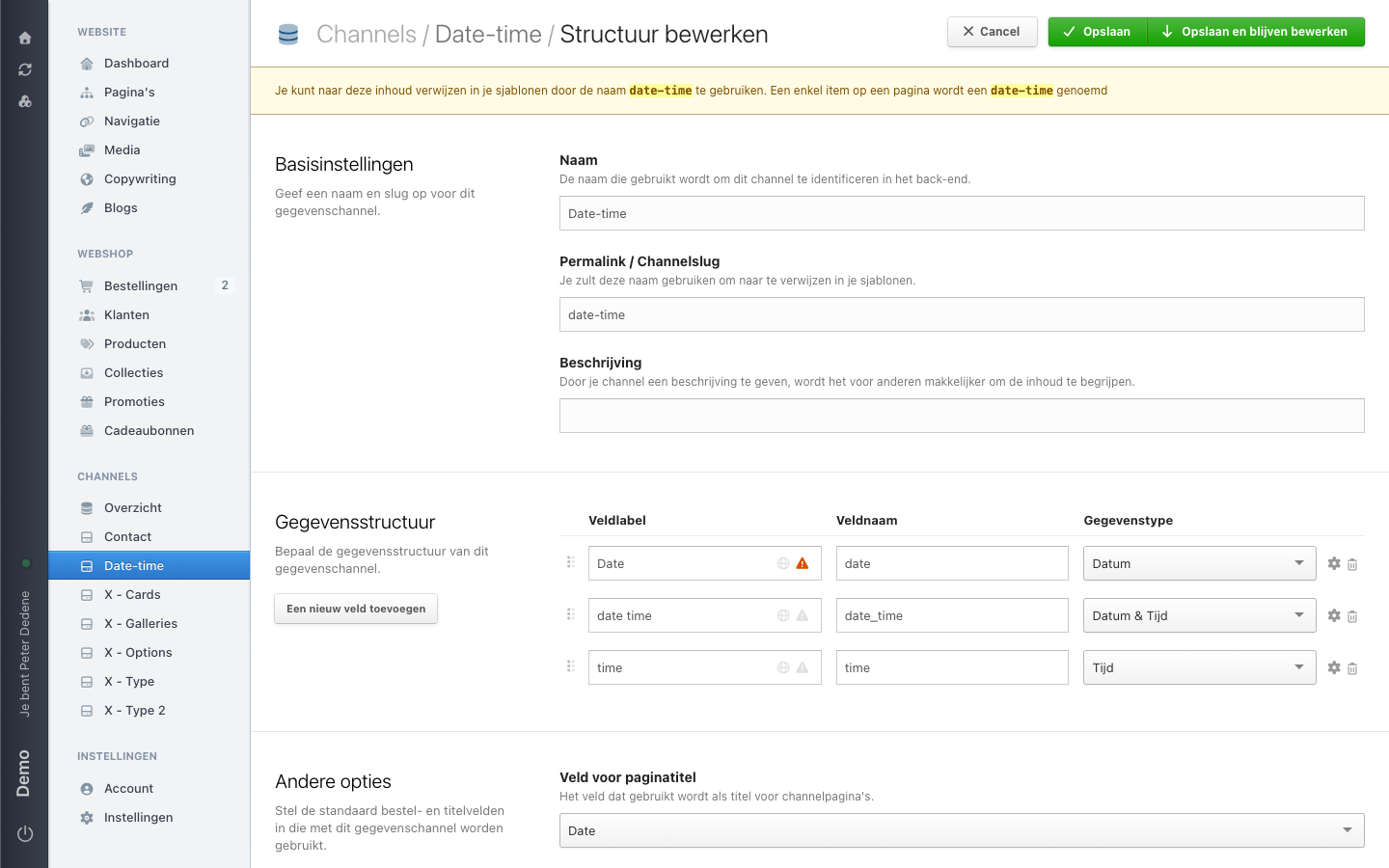
The structure of a channel is the list of fields each item fills in. You open it through Edit structure in the channel toolbar. Every field has a label for editors, a name for the API and a type.
 View full size
Change the label whenever you like. Do not change the field name: it lives in your theme and in every integration reading the data.
The field types
| Type | For |
|---|---|
string | Short single-line text, such as a name or a code |
text | Longer text across several lines, with or without formatting |
email | An email address |
integer | A whole number |
float | A number with decimals |
boolean | Yes or no, such as agreeing to the privacy statement |
file | A single file, for example a PDF |
date | A date without a time |
time | A time without a date |
date_time | Date and time together |
select | One choice from a fixed list |
multi_select | Several choices from a fixed list |
calculated | A value derived from other fields |
belongs_to | A reference to one item in another channel |
belongs_to_many | References to several items in another channel |
customer | A reference to a customer or user |
gallery | A series of images with captions and their own order |
geo | A location |
json | Structured data for developers |
If you hesitate between string and select, pick select as soon as the answers fit on a short list. It saves you cleaning up typos and stray capitals later.
A date stores only the day, such as 2026-09-01. If you also need a start time, use date_time or put a separate time field beside it. The demo channel Date-time has all three variants side by side.
Translatable, required, unique and encrypted
Translatable gives the field a separate value per site language. The Name field in the demo channel X - Options is set that way. Turn it on for text visitors read, not for codes or numbers that are the same in every language.
Required means an item without that value will not save. Nimbu refuses the item and names exactly which field is missing. In the demo channel Contact, first name, name, email, phone and message are all required.
Unique means no two items may hold the same value. Try to save a duplicate code and you get a message that the value is already taken. Useful for reference numbers and article codes.
Encrypted stores the value in encrypted form. The Name field in the demo channel Contact is set that way. Whether you get to see the contents in the admin depends on a site setting and on your permissions. An export can therefore leave such a field empty.
These switches live behind the field settings of each field. Which of them you see depends on the type: encryption, for instance, only makes sense on text.
Option lists
For select and multi_select you set the options yourself. Each option gets a name editors see and a slug your theme uses. Call an option Bibendum Mattis and the slug becomes bibendum-mattis.
Save the field first, then add the options. In the product data model, which works the same way, the link to add an option only appears once the field has been saved once.
You also decide the order in which the options appear. Do not remove an option while items still use it: those items keep a value that no longer points anywhere.
References between channels
With belongs_to and belongs_to_many you link items to another channel. You pick the target channel on the field itself.
On the demo site, X - Cards shows how this works. The field Filter 2 is a belongs_to pointing at X - Type 2: each card has exactly one type. The field Filter 1 is a belongs_to_many pointing at X - Type: a card can have several.
The benefit is that you maintain the list of types in one place. Rename a type and every card pointing at it follows.
References make channels depend on each other
As long as X - Cards points at X - Type, you cannot clean up X - Type without touching the cards. When in doubt, check which channels reference each other first.
Gallery fields
A gallery holds a series of images as one field. Each image has its own place in the order and can carry a caption. The demo channel X - Galleries has one title field and one gallery field.
Use gallery when the number of images differs per item. For exactly one fixed image, file is simpler.
Publication status
Some channels have publication fields: a status with draft, published and scheduled, plus a moment when an item goes live. This is an extension you switch on per channel. In a channel without it, the publication fields are absent and Nimbu saves every item as it is.
If you cannot see those fields and you need them, ask an administrator whether they can be turned on for this channel.