
Online store
Read what the e-commerce switch, the shop address, and the invoice settings do.
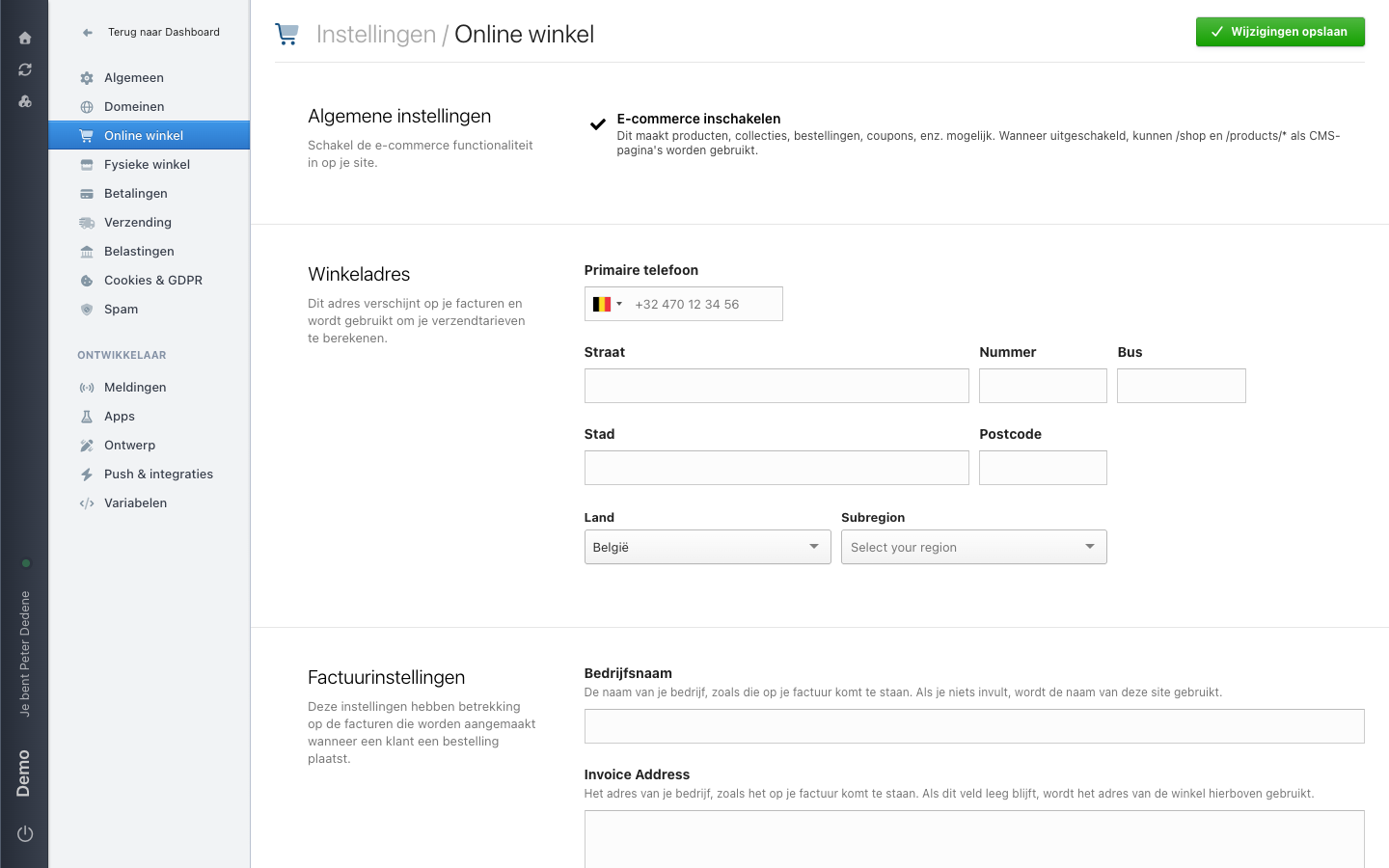
Online winkel (Online store) holds the settings that apply to the whole webshop, not to one product or collection. This page explains what the screen shows.
The labels below are the Dutch ones you see on screen, with the English meaning in brackets.
 View full size
Algemene instellingen (general settings)
This section holds one switch: E-commerce inschakelen (enable e-commerce). It makes products, collections, orders, coupons, and the like possible. With the switch off, you can use /shop and /products/* as ordinary CMS pages. The example has e-commerce on.
Winkeladres (shop address)
This address appears on your invoices and is used to calculate your shipping rates. You fill in a primary phone number, then street, number, box, city, postcode, country, and subregion.
Factuurinstellingen (invoice settings)
These settings cover the invoices created when a customer places an order.
- Bedrijfsnaam (company name) is your company name as it appears on the invoice. Leave it empty and Nimbu uses the name of this site.
- Invoice Address is your company address as it appears on the invoice. Leave it empty and Nimbu uses the shop address above.
Saving
Nothing you change here takes effect until you choose Wijzigingen opslaan (save changes) in the top right.
When Online store is missing
First check that you selected the right site. If Online winkel is still missing, ask an administrator for access to Settings.