
Spam settings and blocked submissions
Manage the spam filter on your forms and review what it blocked.
A contact form on a public site attracts bots. Nimbu filters them out before they reach your ordinary submissions. The Spam area in the Settings menu is where you review what the filter held back and rescue a real message that does not belong there.
Where spam comes from
Form submissions land in a channel. On the demo site that is the Contact channel, with spam detection switched on. How a channel catches submissions is covered in Forms and submissions.
The relationship is simple: Spam in Settings applies to the whole site, and the per-channel setting decides whether that one form takes part. With spam detection off on a channel, nothing from that form ends up in the blocked list.
The blocked overview
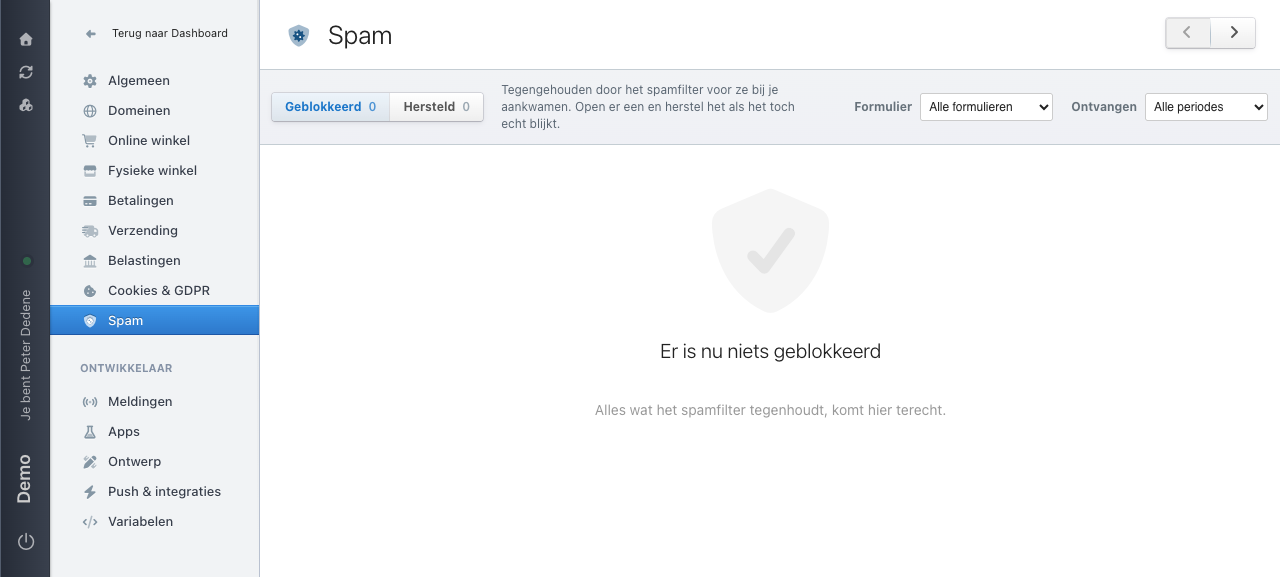
The screen has two tabs with a counter behind each: Geblokkeerd (blocked) for what the filter held back, and Hersteld (recovered) for what you pulled back out of it. The explanation at the top says what this is: held back by the spam filter before they reached you, open one and recover it if it turns out to be genuine.
 View full size
Two filters sit on the right: Formulier (form), to narrow down to one form, and Ontvangen (received), to pick a period. Both start out open to everything.
On the demo site the counter reads zero and the screen shows "Er is nu niets geblokkeerd" (nothing is blocked right now). That is what it looks like before the filter catches anything.
Check it regularly, say once a week. A filter that never blocks anything is suspicious, and a filter blocking a real customer is something you only notice here. How long blocked submissions are kept is not stated on the screen, so do not count on them still being there a month later.
If you find a genuine customer question among the blocked messages, recover it before you clear the list. The visitor gets no signal at their end: somebody whose message was blocked assumes it went through.
Who may review it
Reviewing spam is a separate permission. Whoever lacks it never sees the blocked submissions and so never notices anything is missing. Agree on one person in your team who checks the list, and make sure that person actually holds the permission.
Blocked submissions hold personal data
A message marked as spam can still carry the name, email address, or phone number of a real visitor. Treat the list with the same care as your ordinary submissions. Do not paste screenshots of it into a group chat.
If too much or too little gets through
When visitors report their message never arrived, check the blocked list before you start changing the form itself. The problem is often there rather than in the theme.
When the channel fills up with nonsense instead, check whether spam detection is switched on for that channel at all. That switch sits with the channel, not on this screen.
If that does not settle it, involve a developer. The form in the theme may include a hidden field or a captcha that feeds into what gets held back.
If Spam is missing
Spam sits in the Settings menu below the shop areas. If you do not see it, your role probably has no access to it. Ask an administrator whether the area is available for the selected site.