
Cookies and consent
Read what the cookie policy, purposes, and applications mean before changing anything.
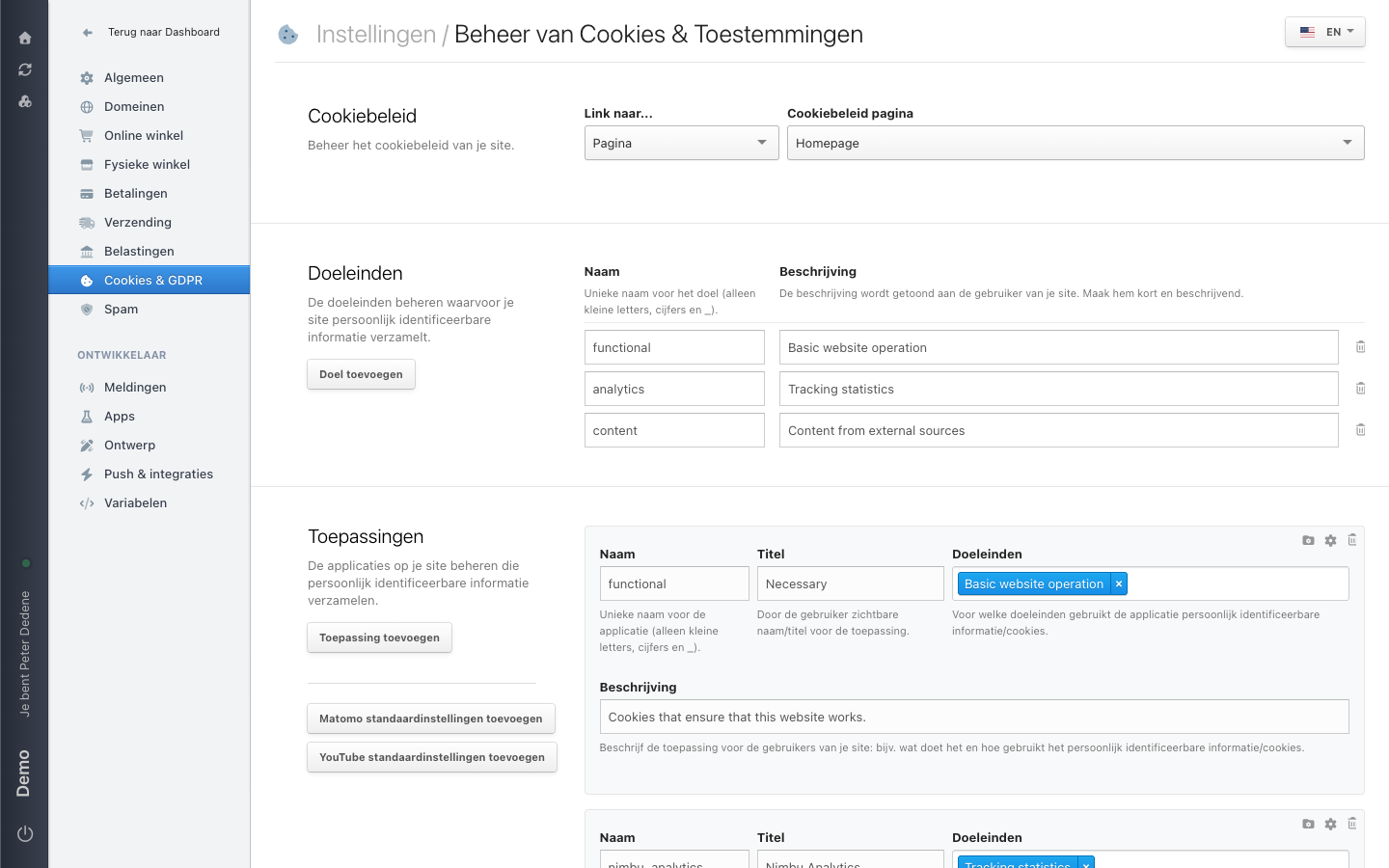
Choose Cookies & GDPR in the Settings menu to open Beheer van Cookies & Toestemmingen (cookie and consent management). It holds how the site presents privacy and cookie choices to visitors. This page explains what you see. It does not tell you what the site should collect or ask permission for.
The labels below are the Dutch ones you see on screen, with the English meaning in brackets.
 View full size
Cookiebeleid (cookie policy)
This is where you point visitors to the site's cookie policy. Link naar… (link to) sets the kind of destination, a page for instance. Cookiebeleid pagina (cookie policy page) then picks which page that is; the example uses Homepage. This is about where the policy lives, not about its contents.
Doeleinden (purposes)
A purpose describes what the site collects personally identifiable information for. Each purpose has two fields:
- Naam (name) is the purpose's unique name. Use lowercase letters, digits, and
_only. - Beschrijving (description) is shown to the visitor. Keep it short and descriptive.
The example holds three purposes: functional (Basic website operation), analytics (Tracking statistics), and content (Content from external sources). Doel toevoegen (add purpose) adds one; the bin icon on a row removes one.
A purpose appearing in the list does not mean it fits your site.
Toepassingen (applications)
Applications are the services on your site that collect personally identifiable information. Each one has four fields:
- Naam: unique name, lowercase letters, digits, and
_only. - Titel (title): the name the visitor sees.
- Doeleinden: which purposes the application uses that information or cookies for.
- Beschrijving: what the application does and how it uses the information.
In the example, functional, titled Necessary, is linked to the Basic website operation purpose and described as "Cookies that ensure that this website works."
Next to Toepassing toevoegen (add application) sit two buttons that fill in a ready-made configuration: Matomo standaardinstellingen toevoegen and YouTube standaardinstellingen toevoegen.
The language of the text
A language picker sits in the top right, set to EN in the example. Consent text differs per language, so check that picker before you review a title or description. It tells you which version visitors see.
When to involve an owner
Ask the site owner or the person responsible for privacy before changing a policy link, purpose, application, or consent text. They can confirm the intended visitor experience and arrange legal review where needed. If the question is about a connected service, involve the developer or integration owner as well.